
Homework 4-Sentiment Analysis
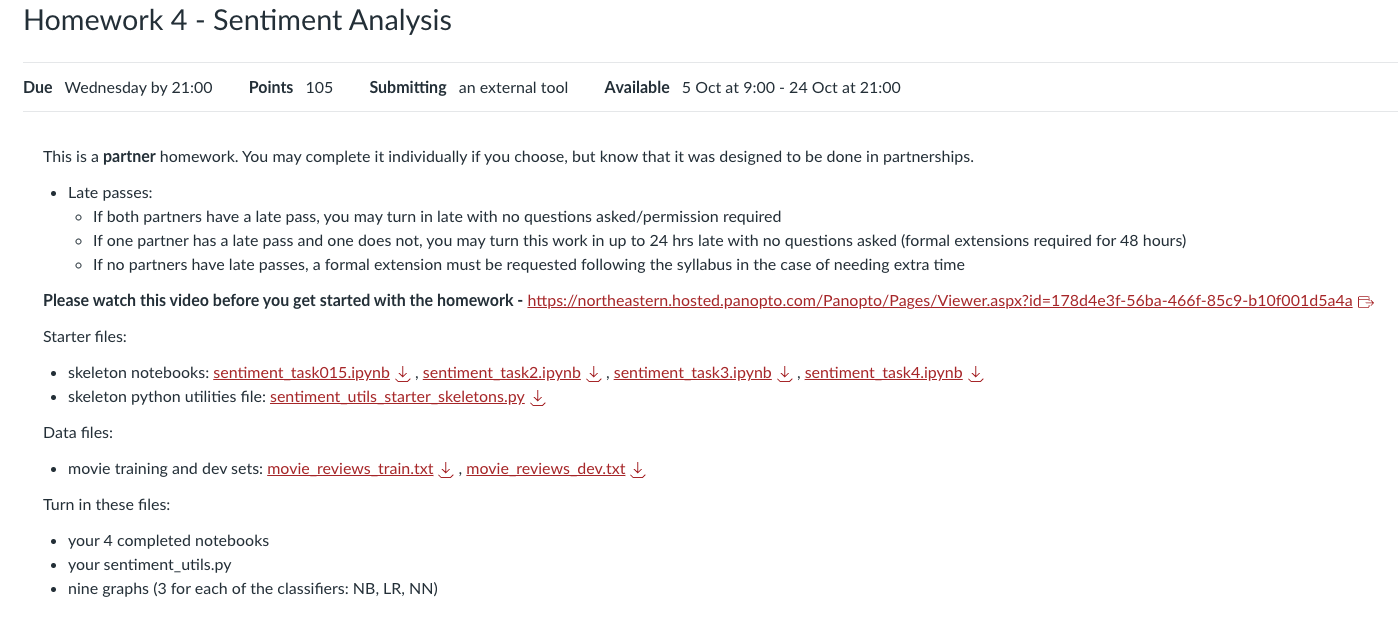
This is a partner homework. You may complete it individually if you choose, but know that it was designed to be done in partnerships.
Late passes:
If both partners have a late pass, you may turn in late with no questions asked/permission required.
If one partner has a late pass and one does not, you may turn this work in up to 24 hrs late with no questions asked (formal extensions required for 48 hours).
If no partners have late passes, a formal extension must be requested following the syllabus in the case of needing extra time.
Please watch this video before you get started with the homework: https://northeastern.hosted.panopto.com/Panopto/Pages/Viewer.aspx?id=178d4e3f-56ba-466f-85c9-b10f001d5a4a
Starter files:
- Skeleton notebooks: sentiment_task015.ipynb、sentiment_task2.ipynb、sentiment_task3.ipynb、sentiment_task4.ipynb
- Skeleton python utilities file: sentiment_utils_starter_skeletons.py
Data files:
- Movie training and dev sets: movie_reviews_train.txt、movie_reviews_dev.txt
Turn in these files:
- Your 4 completed notebooks
- Your
sentiment_utils.py - Nine graphs (3 for each of the classifiers: NB, LR, NN)
The following instructions are only written in this notebook but apply to all notebooks and .py files you submit for this homework.
Due date: October 22nd, 2025 @ 9:00 PM
Points:
- Task 0: 5 points
- Task 1: 10 points
- Task 2: 30 points
- Task 3: 20 points
- Task 4: 20 points
- Task 5: 15 points
Goals:
- understand the difficulties of counting and probablities in NLP applications
- work with real world data to build a functioning language model
- stress test your model (to some extent)
Complete in groups of: two (pairs). If you prefer to work on your own, you may, but be aware that this homework has been designed as a partner project.
Allowed python modules:
numpy,matplotlib,keras,pytorch,nltk,pandas,sci-kit learn(sklearn),seaborn, and all built-in python libraries (e.g.mathandstring)- if you would like to use a library not on this list, post on piazza to request permission
- all necessary imports have been included for you (all imports that we used in our solution)
Instructions:
- Complete outlined problems in this notebook.
- When you have finished, clear the kernel and run your notebook "fresh" from top to bottom. Ensure that there are no errors.
- If a problem asks for you to write code that does result in an error (as in, the answer to the problem is an error), leave the code in your notebook but commented out so that running from top to bottom does not result in any errors.
- Double check that you have completed Task 0.
- Submit your work on Gradescope.
- Double check that your submission on Gradescope looks like you believe it should and that all partners are included (for partner work).
Task 0: Name, References, Reflection (5 points)
Names
Names: YOUR NAMES HERE (Write these in every notebook you submit.)
References
If you used AI tools (like ChatGPT, Claude, Gemini, Copilot, etc.) at any stage of your work, you must explicitly mention them and acknowledge their role. Please also state that you take full responsibility for the final content.
Example AI acknowledgment:
"The author acknowledges the use of Claude AI (Anthropic) for assistance with content organization and executive summary structure. All final interpretations and conclusions remain the author’s responsibility."
List the resources you consulted to complete this homework here. Write one sentence per resource about what it provided to you. If you consulted no references to complete your assignment, write a brief sentence stating that this is the case and why it was the case for you.
(Example)
- https://docs.python.org/3/tutorial/datastructures.html
- Read about the the basics and syntax for data structures in python.
Reflection
Answer the following questions after you complete this assignment (no more than 1 sentence per question required, this section is graded on completion):
- Does this work reflect your best effort?
- What was/were the most challenging part(s) of the assignment?
- If you want feedback, what function(s) or problem(s) would you like feedback on and why?
- Briefly reflect on how your partnership functioned--who did which tasks, how was the workload on each of you individually as compared to the previous homeworks, etc.
Task 1: Provided Data Write-Up (10 points)
Every time you use a data set in an NLP application (or in any software application), you should be able to answer a set of questions about that data. Answer these now. Default to no more than 1 sentence per question needed. If more explanation is necessary, do give it.
This is about the provided movie review data set.
Where did you get the data from? The provided dataset(s) were sub-sampled from https://www.kaggle.com/datasets/lakshmi25npathi/imdb-dataset-of-50k-movie-reviews
数据来自Kaggle网站上的IMDB电影评论数据集,链接为:https://www.kaggle.com/datasets/lakshmi25npathi/imdb-dataset-of-50k-movie-reviews
(1 pt) How was the data collected (where did the people acquiring the data get it from and how)?
数据是从IMDB网站上收集的,评论者提供了对电影的评价和反馈,涵盖了不同种类的电影,数据通过网页抓取或通过API访问获取。
(2 pts) How large is the dataset (answer for both the train and the dev set, separately)? (# reviews, # tokens in both the train and dev sets)
训练集包含1600条评论,验证集包含200条评论。
训练集和验证集的评论每条大致包含230到235个词汇。
训练集和验证集的词汇表大小分别为47,638和11,709,二者有7,245个词汇是重叠的。
详情
# 导入必要的库
import pandas as pd

# 读取训练集和验证集文件
train_file = 'movie_reviews_train.txt'
dev_file = 'movie_reviews_dev.txt'

# 读取数据
train_data = pd.read_csv(train_file, sep='\t', header=None, names=["ID", "Review", "Label"])
dev_data = pd.read_csv(dev_file, sep='\t', header=None, names=["ID", "Review", "Label"])

# 计算训练集和验证集的评论数和每条评论的词汇数
train_num_reviews = len(train_data)
dev_num_reviews = len(dev_data)

# 计算每条评论的词汇数
train_token_counts = train_data['Review'].apply(lambda x: len(x.split()))
dev_token_counts = dev_data['Review'].apply(lambda x: len(x.split()))

# 计算训练集和验证集的词汇数量
train_vocab_size = len(set(" ".join(train_data['Review']).split()))
dev_vocab_size = len(set(" ".join(dev_data['Review']).split()))

# 计算训练集和验证集的词汇表重叠
train_vocab = set(" ".join(train_data['Review']).split())
dev_vocab = set(" ".join(dev_data['Review']).split())
vocab_overlap = len(train_vocab.intersection(dev_vocab))

# 输出结果
train_num_reviews, dev_num_reviews, train_token_counts.describe(), dev_token_counts.describe(), train_vocab_size, dev_vocab_size, vocab_overlap
(1 pt) What is your data? (i.e. newswire, tweets, books, blogs, etc)
数据是关于电影的评论,属于影评数据集。
(1 pt) Who produced the data? (who were the authors of the text? Your answer might be a specific person or a particular group of people)
数据的作者是 IMDB 网站上的用户(Lakshmipathi N、arunmohan_003、Co-learning Lounge),这些评论是由全球影迷和观众根据他们对电影的看法和评价写的。
(2 pts) What is the distribution of labels in the data (answer for both the train and the dev set, separately)?
训练集和验证集的标签分布大致均衡。标签是二分类的(0 代表负面评价,1 代表正面评价),训练集和验证集的正负评价大致相同。
详情
- 训练集标签分布:
- 正面评价(Label=1):804条
- 负面评价(Label=0):796条
- 验证集标签分布:
- 正面评价(Label=1):105条
- 负面评价(Label=0):95条
因此,训练集和验证集的标签分布是大致均衡的。
# 计算训练集和验证集标签的分布 train_label_distribution = train_data['Label'].value_counts() dev_label_distribution = dev_data['Label'].value_counts() train_label_distribution, dev_label_distribution- 训练集标签分布:
(2 pts) How large is the vocabulary (answer for both the train and the dev set, separately)?
训练集的词汇表大小为 47,638。
验证集的词汇表大小为 11,709。
详情
# 重新计算独立词汇数量
train_vocab_unique = set(" ".join(train_data['Review']).split())
dev_vocab_unique = set(" ".join(dev_data['Review']).split())

# 输出训练集和验证集的独立词汇表大小
len(train_vocab_unique), len(dev_vocab_unique)
(1 pt) How big is the overlap between the vocabulary for the train and dev set?
训练集和验证集的词汇表之间有一定的重叠,约为 6132 左右,表示很多常见的词汇在两个数据集中都有出现。
详情
import nltk
from nltk.tokenize import word_tokenize
from collections import Counter

# 下载punkt分词模型(如果尚未下载)
nltk.download('punkt')
nltk.download('punkt_tab')

# 读取并分词的函数
def load_and_tokenize(file_path):
    with open(file_path, 'r', encoding='utf8') as file:
        reviews = file.readlines()
    # 提取评论文本(去除电影ID和评分)
    reviews_text = [line.split("\t")[1] for line in reviews if len(line.strip()) > 0]
    # 分词
    tokenized_reviews = [word_tokenize(review.lower()) for review in reviews_text]
    return tokenized_reviews

# 读取并分词训练集和验证集的评论
train_file_path = 'movie_reviews_train.txt'  # 修改为您训练集的文件路径
dev_file_path = 'movie_reviews_dev.txt'      # 修改为您验证集的文件路径

train_reviews = load_and_tokenize(train_file_path)
dev_reviews = load_and_tokenize(dev_file_path)

# 获取训练集和验证集的词汇表(唯一词汇)
train_vocab = set([word for review in train_reviews for word in review])
dev_vocab = set([word for review in dev_reviews for word in review])

# 计算训练集和验证集词汇表之间的重叠
overlap_vocab = train_vocab.intersection(dev_vocab)
overlap_size = len(overlap_vocab)

# 输出词汇重叠的大小
print(f"词汇表重叠的大小: {overlap_size}")
# our utility functions
# RESTART your jupyter notebook kernel if you make changes to this file
import sentiment_utils as sutils

# Feel free to write code to help answer the above questions
Task 2: Train a Naive Bayes Model (30 points)
Using nltk's NaiveBayesClassifier class, train a Naive Bayes classifier using a Bag of Words as features.
You will be implementing binarized (presence/absence of word) and multinomial (counts of word) BoW representations of your data
Learn more about Naive Bayes here: https://www.nltk.org/_modules/nltk/classify/naivebayes.html
Naive Bayes classifiers use Bayes’ theorem for predictions. Naive Bayes can be a good baseline for NLP applications in particular. You can use it as a baseline for your project!
10 points in Task 5 will be allocated for all 9 graphs (including the one generated here in Task 4 for Naive Bayes Classifier) being:
- Legible
- Present below
- Properly labeled
- x and y axes labeled
- Legend for accuracy measures plotted
- Plot Title with which model and run number the graph represents
# our utility functions
# RESTART your jupyter notebook kernel if you make changes to this file
import sentiment_utils as sutils

# nltk for Naive Bayes and metrics
import nltk
import nltk.classify.util
from nltk.metrics.scores import (precision, recall, f_measure, accuracy)
from nltk.classify import NaiveBayesClassifier

# some potentially helpful data structures from collections
from collections import defaultdict, Counter

# so that we can make plots
import matplotlib.pyplot as plt
# if you want to use seaborn to make plots
#import seaborn as sns


# define constants for the files we are using
TRAIN_FILE = "movie_reviews_train.txt"
DEV_FILE = "movie_reviews_dev.txt"


# load in your data and make sure you understand the format
# Do not print out too much so as to impede readability of your notebook
train_tups = sutils.generate_tuples_from_file(TRAIN_FILE)
dev_tups = sutils.generate_tuples_from_file(DEV_FILE)


# set up a sentiment classifier using NLTK's NaiveBayesClassifier and
# a bag of words as features
# take a look at the function in lecture notebook 7 (feel free to copy + paste that function)
# the nltk classifier expects a dictionary of features as input where the key is the feature name
# and the value is the feature value

# need to return a dict to work with the NLTK classifier
# Possible problem for students: evaluate the difference
# between using binarized features and using counts (non binarized features)
def word_feats(PARAMETERS ARE UP TO YOU) -> dict:
    # STUDENTS IMPLEMENT
    pass


# set up & train a sentiment classifier using NLTK's NaiveBayesClassifier and
# classify the first example in the dev set as an example
# make sure your output is well-labeled


# test to make sure that you can train the classifier and use it to classify a new example
Expected Behavior
Naive Bayes: Naive Bayes relies on word counts or feature frequencies to compute probabilities. Since it does not involve random initialization, it is a deterministic algorithm: meaning it will always produce identical results given the same data and preprocessing steps. So, if your Naive Bayes graphs are identical across runs, this is expected and completely fine!
Note on Training Data Increments
When varying the amount of training data, choose increments that are meaningful and reasonable, you should be able to observe clear trends without making the experiment unnecessarily long. You may increment the training data percentage by 5%, 10% or 20%.
Make sure that one of your experiments includes 10% of the training data, as you will need this result to answer a question in Task 5.
# Using the provided dev set, evaluate your model with precision, recall, and f1 score as well as accuracy
# You may use nltk's implemented `precision`, `recall`, `f_measure`, and `accuracy` functions
# (make sure to look at the documentation for these functions!)
# you will be creating a similar graph for logistic regression and neural nets, so make sure
# you use functions wisely so that you do not have excessive repeated code
# write any helper functions you need in sentiment_utils.py (functions that you'll use in your other notebooks as well)


# create a graph of your classifier's performance on the dev set as a function of the amount of training data
# the x-axis should be the amount of training data (as a percentage of the total training data)
# NOTE : make sure one of your experiments uses 10% of the data, you will need this to answer the first question in task 5
# the y-axis should be the performance of the classifier on the dev set
# the graph should have 4 lines, one for each of precision, recall, f1, and accuracy
# the graph should have a legend, title, and axis labels
Test your model using both a binarized (bag of words representation where we put 1 [true] if the word is there and 0 [false] otherwise) and a multinomial (bag of words representation where we put the count of the word if the word occurs, and 0 otherwise). Use whichever one gives you a better final f1 score on the dev set to produce your graphs.
- f1 score binarized: YOUR ANSWER HERE
- f1 score multinomial: YOUR ANSWER HERE
Task 3: Train a Logistic Regression Model (20 points)
Using sklearn's implementation of LogisticRegression, conduct a similar analysis on the performance of a Logistic Regression classifier on the provided data set.
Using the time module, you'll compare and contrast how long it takes your home-grown BoW vectorizing function vs. sklearn's CountVectorizer.
You will be implementing multinomial (counts of word) BoW representations of your data
Logistic regression is used for binary classification, but can be extended for multi-class classification
Read more about logistic regression here - https://www.analyticsvidhya.com/blog/2021/08/conceptual-understanding-of-logistic-regression-for-data-science-beginners/.
Recall from task 2 what binarized and multinomial mean here: a binarized bag of words representation is one where we put 1 [true] if the word is there and 0 [false] otherwise, and a multinomial bag of words representation is one where we put the count of the word if the word occurs, and 0 otherwise.
10 points in Task 5 will be allocated for all 9 graphs (including the one generated here in Task 3 for Logistic Regression) being:
- Legible
- Present below
- Properly labeled
- x and y axes labeled
- Legend for accuracy measures plotted
- Plot Title with which model and run number the graph represents
from sklearn.linear_model import LogisticRegression
# https://scikit-learn.org/stable/modules/generated/sklearn.feature_extraction.text.CountVectorizer.html
from sklearn.feature_extraction.text import CountVectorizer

from collections import Counter
import time
import sentiment_utils as sutils

# define constants for the files we are using
TRAIN_FILE = "movie_reviews_train.txt"
DEV_FILE = "movie_reviews_dev.txt"

# load in your data and make sure you understand the format
# Do not print out too much so as to impede readability of your notebook
train_tups = sutils.generate_tuples_from_file(TRAIN_FILE)
dev_tups = sutils.generate_tuples_from_file(DEV_FILE)

# some variables you may want to use
# BINARIZED = True
# USE_COUNT_VECTORIZER = False


# Write the functions needed (here or in sentiment_utils.py) to create vectorized BoW representations
# of your data. We recommend starting with a multinomial BoW representation.
# Each training example should be represented as a sparse vector.


# how much time does it take to featurize the all data with your implementation?

start = time.time()

# YOUR CODE HERE


end = time.time()
print("That took:", end - start, "seconds")


# how much time does it take to featurize the all data with sklearn's CountVectorizer?

start = time.time()


# YOUR CODE HERE

end = time.time()
print("That took:", end - start, "seconds")- How big is your vocabulary using your vectorization function(s)? YOUR ANSWER HERE
- How big is your vocabulary using the
CountVectorizer? YOUR ANSWER HERE
#  write any code you need analyze the relative sparsity of your vectorized representations of the data

# YOUR CODE HERE

# Print out the average % of entries that are zeros in each vector in the vectorized training data
# YOUR CODE HERE
Expected Behavior
Logistic Regression: Logistic Regression can behave either deterministically or non-deterministically depending on whether random initialization is involved. On small datasets, results often converge to the same optimum, producing identical graphs. However, when a random seed affects initialization, minor variation may or may not appear between runs. Either case is acceptable!
Note on Training Data Increments
When varying the amount of training data, choose increments that are meaningful and reasonable, you should be able to observe clear trends without making the experiment unnecessarily long. You may increment the training data percentage by 5%, 10% or 20%.
Make sure that one of your experiments includes 10% of the training data, as you will need this result to answer a question in Task 5.
# Using the provided dev set, evaluate your model with precision, recall, and f1 score as well as accuracy
# You may use nltk's implemented `precision`, `recall`, `f_measure`, and `accuracy` functions
# (make sure to look at the documentation for these functions!)
# you will be creating a similar graph for logistic regression and neural nets, so make sure
# you use functions wisely so that you do not have excessive repeated code
# write any helper functions you need in sentiment_utils.py (functions that you'll use in your other notebooks as well)


# create a graph of your classifier's performance on the dev set as a function of the amount of training data
# the x-axis should be the amount of training data (as a percentage of the total training data)
# NOTE : make sure one of your experiments uses 10% of the data, you will need this to answer the first question in task 5
# the y-axis should be the performance of the classifier on the dev set
# the graph should have 4 lines, one for each of precision, recall, f1, and accuracy
# the graph should have a legend, title, and axis labels
Test the following 4 combinations to determine which has the best final f1 score for your Logistic Regression model:
- your vectorized features, multinomial: enter your final f1 score here
- CountVectorizer features, multinomial: enter your final f1 score here
- your vectorized features, binarized: enter your final f1 score here
- CountVectorizer features, binarized: enter your final f1 score here
Produce your graph(s) for the combination with the best final f1 score.
Task 4: Neural Networks (20 points)
Next, we'll train a feedforward neural net to work with this data. You'll train one neural net which takes the same input as your Logistic Regression model - a sparse vector representing documents as bags of words.
Take a look at these videos to understand forward and backward propagation in neural networks -
- https://www.youtube.com/watch?v=HHbjpDHcJVw
- https://youtu.be/-Lavz_I4l2U?si=zi20DB3qKPLMEPt1
You will be implementing binarized (presence/absence of word) and multinomial (counts of word) BoW representations of your data
10 points in Task 5 will be allocated for all 9 graphs (including the one generated here in Task 4 for Neural Networks) being:
- Legible
- Present below
- Properly labeled
- x and y axes labeled
- Legend for accuracy measures plotted
- Plot Title with which model and run number the graph represents
import sentiment_utils as sutils
import numpy as np

from keras.models import Sequential
from keras.layers import Dense

# you can experiment with having some Dropout layers if you'd like to
# this is not required
from keras.layers import Dropout

# if you want to use this again
from sklearn.feature_extraction.text import CountVectorizer


# define constants for the files we are using
TRAIN_FILE = "movie_reviews_train.txt"
DEV_FILE = "movie_reviews_dev.txt"

# load in your data and make sure you understand the format
# Do not print out too much so as to impede readability of your notebook
train_tups = sutils.generate_tuples_from_file(TRAIN_FILE)
dev_tups = sutils.generate_tuples_from_file(DEV_FILE)

# you may use either your sparse vectors or sklearn's CountVectorizer's sparse vectors
# you will experiment with multinomial and binarized representations later


# Create a feedforward neural network model
# that takes a sparse BoW representation of the data as input
# and makes a binary classification of positive/negative sentiment as output
# you may use any number of hidden layers >= 1 and any number of units in each hidden layer (we recommend between 50-200)
# you may use any activation function on the hidden layers
# you should use a sigmoid activation function on the output layer
# you should use binary cross-entropy as your loss function
# sgd is an appropriate optimizer for this task
# you should report accuracy as your metric
# you may add Dropout layers if you'd like to

# create/compile your model in this cell

model = Sequential()


# put in an output layer


model.summary()
# call compile here
How many trainable parameters does your model have? YOUR ANSWER HERE
# train your model


# Failed to find data adapter that can handle input: <class 'numpy.ndarray'>, (<class 'list'> containing values of types {"<class 'int'>"})
# indicates you should change a list into a numpy array

# make a prediction on the dev set
# then make a classification decision based on that prediction

# use the model.evaluate function to report the loss and accuracy on the dev set
Expected Behavior
Neural Networks: Neural networks initialize their weights randomly and learn through iterative stochastic optimization, which introduces non-determinism by design. Even with the same data and parameters, different runs may lead to slightly different learned weights and therefore different graphs. In this case, variation between your three runs is expected and desired, it shows how the model’s training process can vary due to randomness.
Note on Training Data Increments
When varying the amount of training data, choose increments that are meaningful and reasonable, you should be able to observe clear trends without making the experiment unnecessarily long. You may increment the training data percentage by 5%, 10% or 20%.
Make sure that one of your experiments includes 10% of the training data, as you will need this result to answer a question in Task 5.
# create the same graph as with NB and LR, with your neural network model instead!
# make sure to re-create your model each time you train it — you don't want to start with
# an already trained network!

# you should experiment with different numbers of epochs to see how performance varies
# you need not create an experiment that takes > 10 min to run (gradescope will run out of computing resources and give you a 0)
Report the f1 scores for your model with the following settings, using the same number of epochs to train in both cases:
- number of epochs used: YOUR ANSWER HERE
- multinomial features: YOUR ANSWER HERE
- binarized features: YOUR ANSWER HERE
Task 5: Model Evaluation (15 points)
Save your three graph files for the best configurations that you found with your models using the plt.savefig(filename) command. The bbox_inches optional parameter will help you control how much whitespace outside of the graph is in your resulting image.
NOTE ABOUT THE GRAPHS:
Run each notebook containing the best classifier three times, saving the output graphs separately each time. This should result in a total of NINE distinct graphs (three per notebook, e.g. for the three Naive Bayes model graphs you would have Naive_Bayes_run1.png, Naive_Bayes_run2.png, Naive_Bayes_run3.png, etc.). Ensure you do not overwrite previous graphs when you save the graphs as images.
The goal of running the notebook three times is to check if your model's performance is consistent, confirming that your results are reliable and not due to randomness.
If all your graphs look identical, remove the random seed parameter (for logistic regression) and re-run the notebook. The absence of a seed might introduce variation between runs.
Should the graphs remain identical even after removing the seed, you may proceed with submitting the three identical graphs for the model.
Repeat this process for each of the three notebooks.
You will turn in all of these files.
Additional Clarifications
Naive Bayes: Naive Bayes relies on word counts or feature frequencies to compute probabilities. Since it does not involve random initialization, it is a deterministic algorithm: meaning it will always produce identical results given the same data and preprocessing steps. So, if your Naive Bayes graphs are identical across runs, this is expected and completely fine!
Logistic Regression: Logistic Regression can behave either deterministically or non-deterministically depending on whether random initialization is involved. On small datasets, results often converge to the same optimum, producing identical graphs. However, when a random seed affects initialization, minor variation may or may not appear between runs. Either case is acceptable!
Neural Networks: Neural networks initialize their weights randomly and learn through iterative stochastic optimization, which introduces non-determinism by design. Even with the same data and parameters, different runs may lead to slightly different learned weights and therefore different graphs. In this case, variation between your three runs is expected and desired, it shows how the model’s training process can vary due to randomness.
Note on Training Data Increments
When varying the amount of training data, choose increments that are meaningful and reasonable, you should be able to observe clear trends without making the experiment unnecessarily long. You may increment the training data percentage by 5%, 10% or 20%.
Make sure that one of your experiments includes 10% of the training data, as you will need this result to answer a question in Task 5.
10 points in this section are allocated for all 9 graphs being:
- Legible
- Present below
- Properly labeled
- x and y axes labeled
- Legend for accuracy measures plotted
- Plot Title with which model and run number the graph represents
## YOUR CODE

## Please insert filepaths to the 9 plot images you created with your code below
import matplotlib.image as mpimg
import matplotlib.pyplot as plt
import numpy as np

fig, axs = plt.subplots(3, 3, figsize=(10, 10))

placeholder_paths = [
    "path/to/image1.png", "path/to/image2.png", "path/to/image3.png", ## paths for the three Naive Bayes model graphs
    "path/to/image4.png", "path/to/image5.png", "path/to/image6.png", ## paths for the three Logistic Regression model graphs
    "path/to/image7.png", "path/to/image8.png", "path/to/image9.png" ## paths for the three Neural Network model graphs
]

for i, ax in enumerate(axs.flat):
    try:
        img = mpimg.imread(placeholder_paths[i])
        ax.imshow(img)
    except FileNotFoundError:
        ax.text(0.5, 0.5, f"Missing Image\n{placeholder_paths[i]}",
                ha='center', va='center', fontsize=12, color='red')
        ax.set_facecolor('lightgray')
    ax.set_title(f"Image {i+1}")

    ax.set_xticks([])
    ax.set_yticks([])

plt.tight_layout()
plt.show()- (1 pt) When using 10% of your data, which model had the highest f1 score?
- (1 pt) Which classifier had the most consistent performance (that is, which classifier had the least variation across all three graphs you have for it -- no need to mathematically calculate this, you can just look at the graphs)?
- (1 pt) For each model, what percentage of training data resulted in the highest f1 score?
- Naive Bayes:
- Logistic Regression:
- Neural Net:
- (2 pts) Which model, if any, appeared to overfit the training data the most? Why?
sentiment_utils_starter_skeletons.py
# FIRST: RENAME THIS FILE TO sentiment_utils.py

# YOUR NAMES HERE:


"""

CS 4120
Homework 4
Fall 2025

Utility functions for HW 4, to be imported into the corresponding notebook(s).

Add any functions to this file that you think will be useful to you in multiple notebooks.
"""
# fancy data structures
from collections import defaultdict, Counter
# for tokenizing and precision, recall, f_measure, and accuracy functions
import nltk
# for plotting
import matplotlib.pyplot as plt
# so that we can indicate a function in a type hint
from typing import Callable
nltk.download('punkt')

def generate_tuples_from_file(training_file_path: str) -> list:
    """
    Generates data from file formated like:

    tokenized text from file: [[word1, word2, ...], [word1, word2, ...], ...]
    labels: [0, 1, 0, 1, ...]

    Parameters:
        training_file_path - str path to file to read in
    Return:
        a list of lists of tokens and a list of int labels
    """
    # PROVIDED
    f = open(training_file_path, "r", encoding="utf8")
    X = []
    y = []
    for review in f:
        if len(review.strip()) == 0:
            continue
        dataInReview = review.strip().split("\t")
        if len(dataInReview) != 3:
            continue
        else:
            t = tuple(dataInReview)
            if (not t[2] == '0') and (not t[2] == '1'):
                print("WARNING")
                continue
            X.append(nltk.word_tokenize(t[1]))
            y.append(int(t[2]))
    f.close()
    return X, y


"""
NOTE: for all of the following functions, we have provided the function signature and docstring, *that we used*, as a guide.
You are welcome to implement these functions as they are, change their function signatures as needed, or not use them at all.
Make sure that you properly update any docstrings as needed.
"""


def get_prfa(dev_y: list, preds: list, verbose=False) -> tuple:
    """
    Calculate precision, recall, f1, and accuracy for a given set of predictions and labels.
    Args:
        dev_y: list of labels
        preds: list of predictions
        verbose: whether to print the metrics
    Returns:
        tuple of precision, recall, f1, and accuracy
    """
    #TODO: implement this function
    pass

def create_training_graph(metrics_fun: Callable, train_feats: list, dev_feats: list, kind: str, savepath: str = None, verbose: bool = False) -> None:
    """
    Create a graph of the classifier's performance on the dev set as a function of the amount of training data.
    Args:
        metrics_fun: a function that takes in training data and dev data and returns a tuple of metrics
        train_feats: a list of training data in the format [(feats, label), ...]
        dev_feats: a list of dev data in the format [(feats, label), ...]
        kind: the kind of model being used (will go in the title)
        savepath: the path to save the graph to (if None, the graph will not be saved)
        verbose: whether to print the metrics
    """
    #TODO: implement this function
    pass


def create_index(all_train_data_X: list) -> list:
    """
    Given the training data, create a list of all the words in the training data.
    Args:
        all_train_data_X: a list of all the training data in the format [[word1, word2, ...], ...]
    Returns:
        vocab: a list of all the unique words in the training data
    """
    # figure out what our vocab is and what words correspond to what indices
    #TODO: implement this function
    pass


def featurize(vocab: list, data_to_be_featurized_X: list, binary: bool = False, verbose: bool = False) -> list:
    """
    Create vectorized BoW representations of the given data.
    Args:
        vocab: a list of words in the vocabulary
        data_to_be_featurized_X: a list of data to be featurized in the format [[word1, word2, ...], ...]
        binary: whether or not to use binary features
        verbose: boolean for whether or not to print out progress
    Returns:
        a list of sparse vector representations of the data in the format [[count1, count2, ...], ...]
    """
    # using a Counter is essential to having this not take forever
    #TODO: implement this function
    pass
公众号:AI悦创【二维码】

AI悦创·编程一对一
AI悦创·推出辅导班啦,包括「Python 语言辅导班、C++ 辅导班、java 辅导班、算法/数据结构辅导班、少儿编程、pygame 游戏开发、Web、Linux」,招收学员面向国内外,国外占 80%。全部都是一对一教学:一对一辅导 + 一对一答疑 + 布置作业 + 项目实践等。当然,还有线下线上摄影课程、Photoshop、Premiere 一对一教学、QQ、微信在线,随时响应!微信:Jiabcdefh
C++ 信息奥赛题解,长期更新!长期招收一对一中小学信息奥赛集训,莆田、厦门地区有机会线下上门,其他地区线上。微信:Jiabcdefh
方法一:QQ
方法二:微信:Jiabcdefh