
Assagment1
Introduction
In this assignment, you will make use of Python programming to implement a simple game called 1023 Game. The game is inspired by both the 2048 game and the Tetris game.
Piece
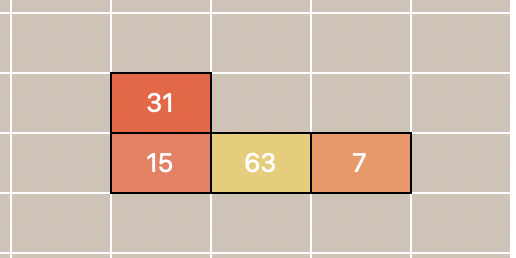
In the 1023 Game, a piece is a connected group of 4 blocks, just like the Tetris game. There are 7 types of pieces in our game. The player can control the movement of each piece. More information about the movement in the "Gameplay" section.
Block
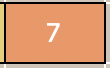
A block is the smallest unit in the 1023 Game. Each block has a value of 1, 3, 7, 15, ..., 1023 (each number is two times the previous number plus one: , ...). The values can be changed through merging when a block stacks on top of another block of equal value. More information about the merging rule is in the "Gameplay" section.
Movement
Before we start implementing the game, let's first understand the gameplay of the 1023 Game. As shown in the screenshot below, this game is played on a 20x6 grid. The player can move the pieces left, right, down, or rotate them. The player can also drop the piece to the bottom of the grid.
A proposed move is considered valid if none of the blocks of the piece move into the position of another block already on the grid (no overlapping blocks) or is out of bounds. If the move is considered invalid, the move will be ignored, and nothing happens. Some important rules about the movement of the piece:
The blocks do not fall automatically. That is, unlike Tetris, if the player does nothing, the piece will stay at the original position.
The pieces can be moved with the
'a','s','d'keys on the keyboard. In the graphical user interface (GUI) mode of the game, controlling with the arrow keys is also possible. The'w'key and the up arrow key are used for rotating the piece. Pieces do not move upwards.Press the space bar on the keyboard to drop the piece to the bottom of the grid. When blocks of equal value stack vertically, they merge. Unlike Tetris, gravity (dropping down) is applied to each block individually, not to the entire piece as a whole.
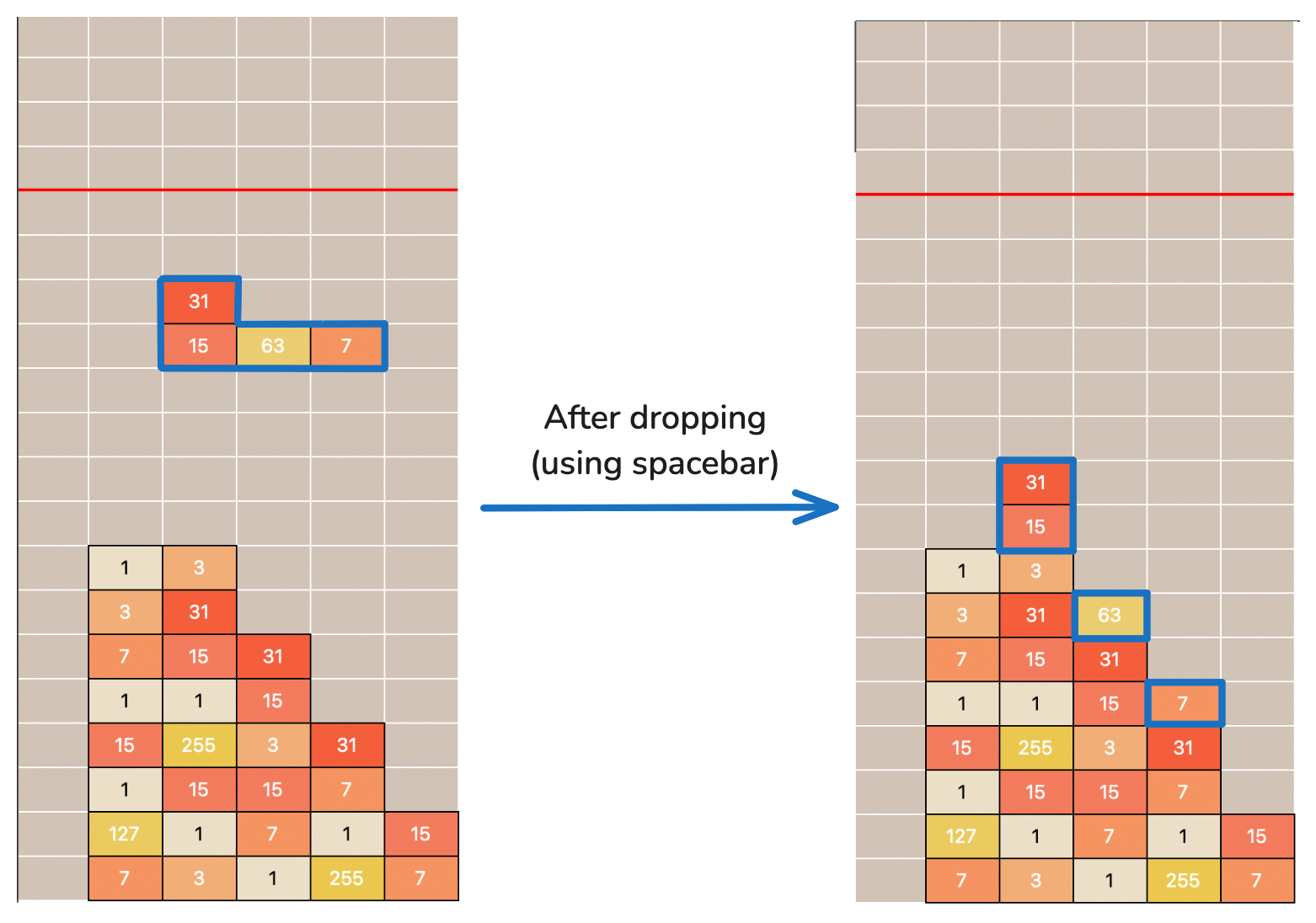
Drop Since pieces will not fall automatically, the player has to press the space bar to drop the piece and continue the game. Even if the piece is already at the bottom, the space bar still needs to be pressed to proceed to the next piece.
Merging
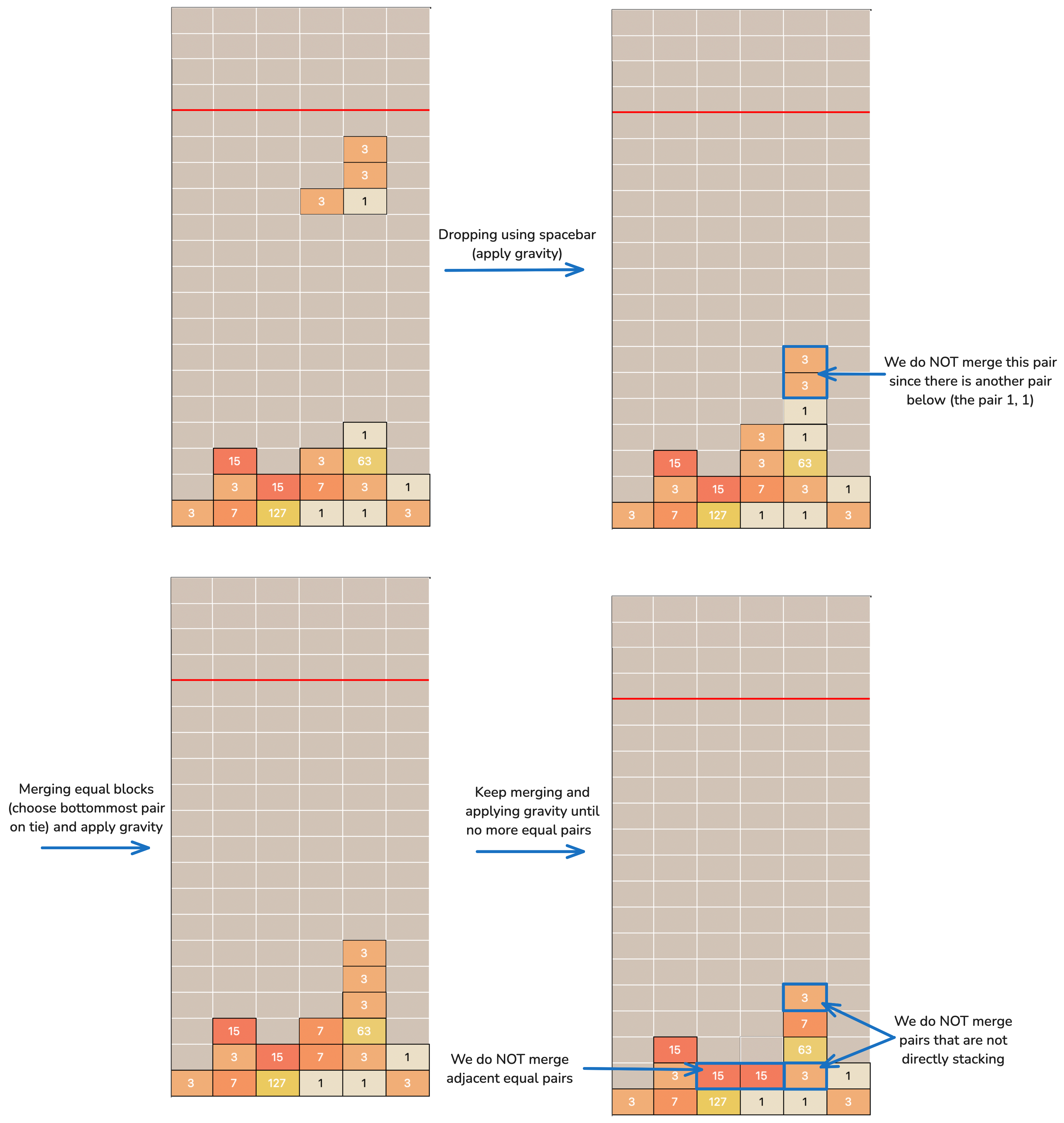
In this game, we have a special rule for merging blocks. When two blocks of equal values are stacked vertically, they will merge into a new block. The value of the new block is the sum of the values of the two blocks plus 1. After merging, the two blocks are replaced with the new block (with a value equal to two times the original value plus one) at the position of the lower block. For example, when two blocks of 15 are stacked, they will merge into a block of 31 (= 15 + 15 + 1) at the position of the lower block (higher row index number). The result is NOT directly adding the values of the two blocks.
One special case is that when there are multiple blocks of equal value stacked together, the pair of blocks closest to the bottom will be merged first. Refer to the example below for a better understanding.
Gameplay
The game starts with an empty grid. The game will keep generating new pieces with 4 blocks, each with a value randomly chosen from [1, 3, 7, 15, 31, 63, 127, 255]. The player can move the piece or drop the piece, and the game proceeds with the mechanics specified above.
The goal of the player is to create a block with a value of 1023 through merging, and if they do so before losing the game, they win.
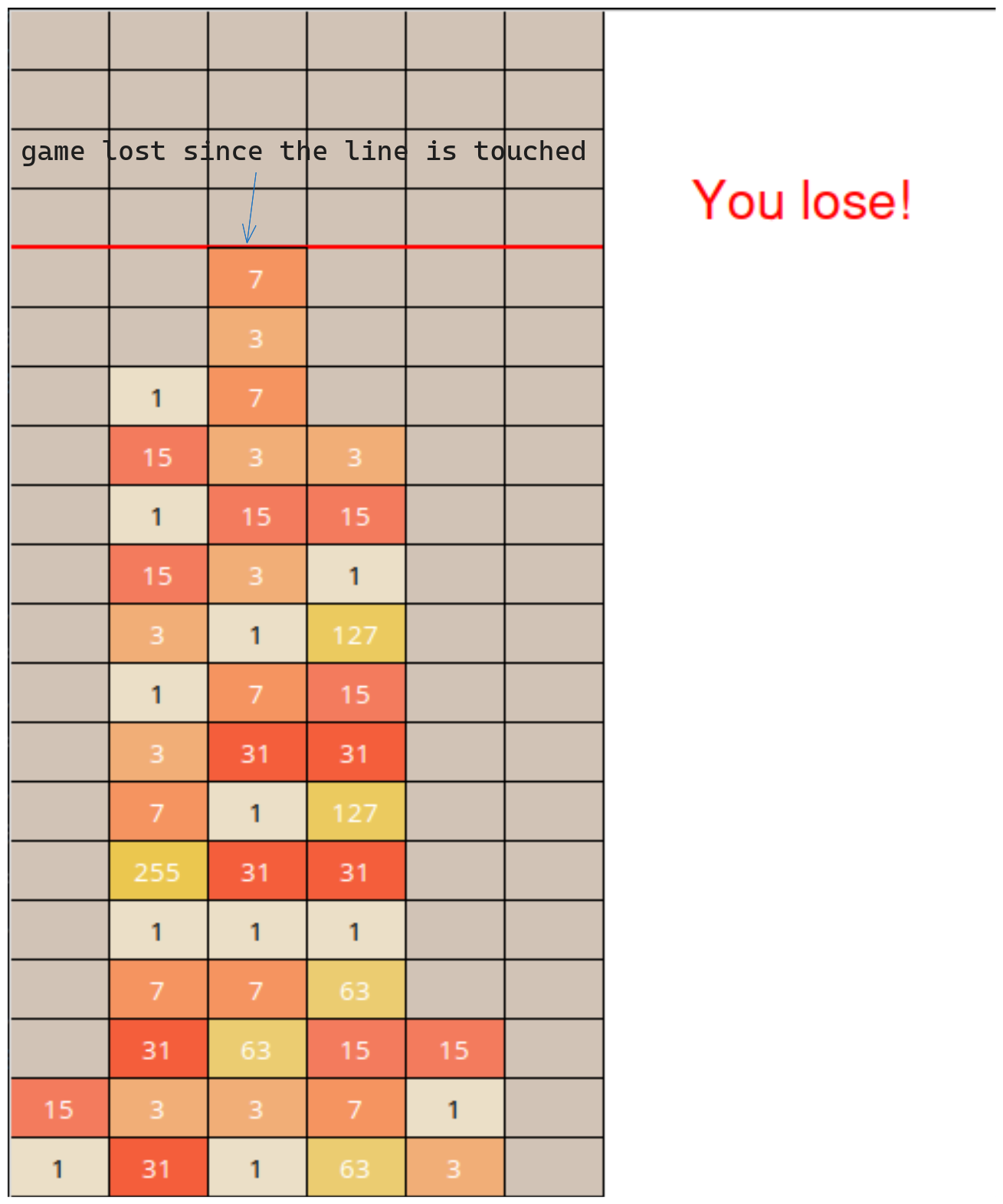
The game will end when the player reaches the goal (has a block with a value of 1023) or any block touches the red limit line of the grid (that is, if there is any block in the top five rows) after merging checking, and all blocks of the current piece have fallen. If any block touches the line after the block merging process, the game ends, and the player loses. The limit line is represented by the red line in the images above. You can also observe the red limit line when you run your game. An example of a game lost is shown below.
An example game play video recording is shown below.
Technical Details
In this section, we will provide some technical details about the game implementation.
Game board: The game board is a 20x6 grid, and will be stored as a 2D list of values. A cell is referenced in the list as
game_board[row_number][col_number]. Each cell contains a block value that can be used for merging. In this game, possible beginning block values are either1 or 3 or 7 or 15 or 31 or 63 or 127 or 255. Also, in this assignment, we will be following Python's convention of 0-based indexing.For easier implementation, the game board will NOT store data of the floating piece.
For example, in the example below, we have
game_board[18][1] = 127, butgame_board[6][2] = 0.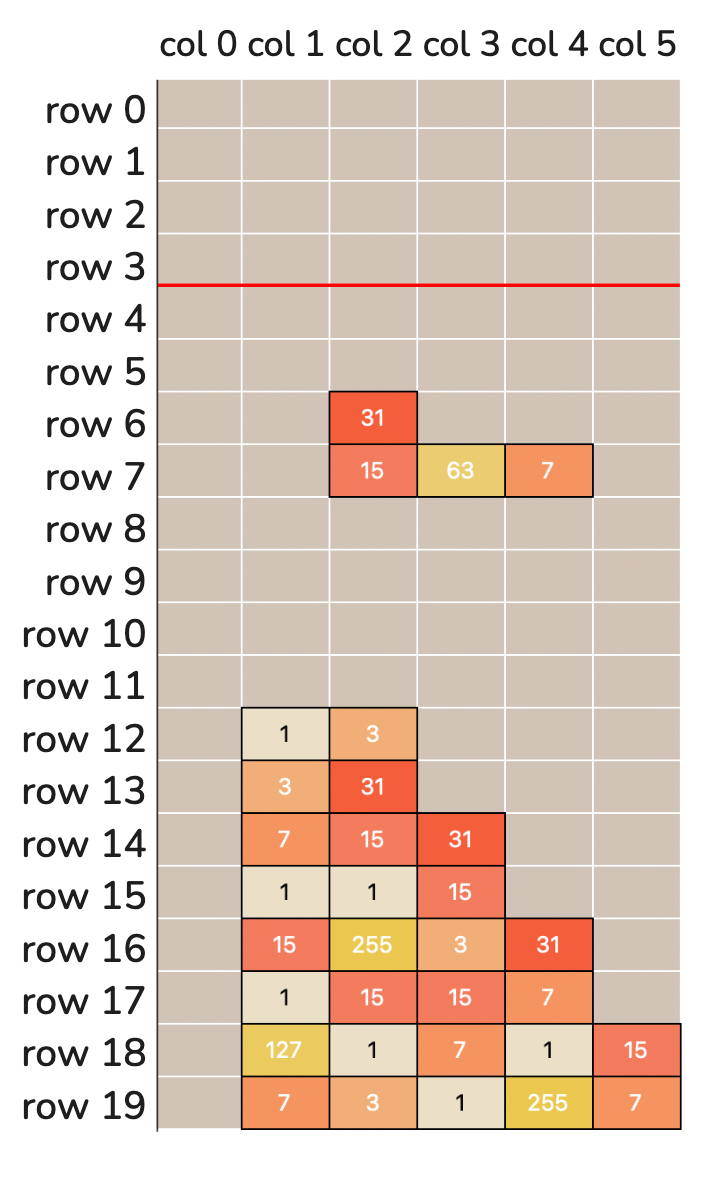
gameboard.png Piece shape and location: The shapes of the pieces are stored in the list
shapes(initialization is contained in the top portion of the provided skeleton program), accessed usingshapes[piece_number][rotation_number][block_number][dimension]. Each element in the 4D list is anint, the row or column offset of the block.For example,
shapes[6][3] = [[0, 2], [-1, 1], [0, 1], [1, 1]], 6 corresponds to the T-shaped piece (shape 6), and 3 means the piece is rotated 3 times. The offsets of the first block (block 0) are[0, 2]. This means that the first block is at the same row as the piece's location (each piece has an anchor location), and 2 columns to the right of the piece's location.The location of a piece is stored as a pair of integers, the row and column of the piece, in a list of two integers
[r, c]. It is the reference point for the blocks of the piece. The location of the piece itself may overlap with other blocks, or even outside the grid. When a piece is moved, the location of the piece is updated, and the new location is used to calculate the new position of the blocks using the offsets. All pieces start at position[0, 1](row index: 0 and column index: 1).An example is provided here for better understanding (shape 6 rotation 3).
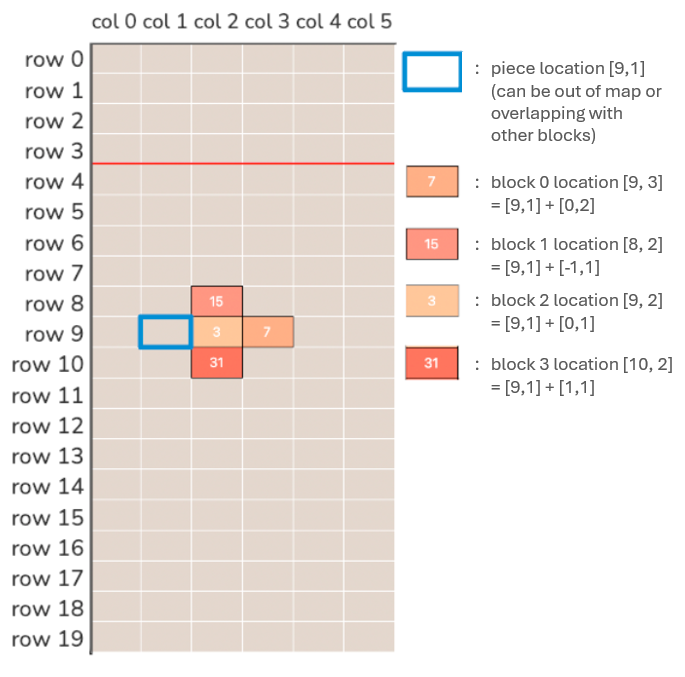
shapes_new.png Suppose we want to calculate the position of the third block (block number 2) of the piece (shape number 6, rotation number 3). We can get the row offset by
shapes[6][3][2][0], which should be 0, and the column offset byshapes[6][3][2][1], which should be 1. These offsets are then added to the piece's position at [row 9, column 1] to get the position of the block [row 9 + 0, column 1 + 1] = [row 9, column 2] or position [9, 2].Consider the piece
shapes[6][3][2][1].- The first index (piece_number)
6indicates the piece shape. Shape number 6 corresponds to the T-shaped piece. - The second index (rotation_number)
3indicates that the piece is rotated 3 times. - The third index (block_number)
2indicates block number 2 of the piece. - The fourth index (dimension)
1indicates the column offset of the block. Index of0contains the row offset instead. The dimension index is always either0(for row) or1(for column).
- The first index (piece_number)
Rotation: The player can rotate the piece using the 'w' key or the up arrow key. The rotation is stored with an integer indicating the number of 90-degree rotations performed. However, in order to keep the numbers small and stop them from growing indefinitely, the rotation number is kept as
0 or 1 or 2 or 3. After 3 rotations, if the player rotates the piece again, the rotation number will be reset to 0, since the piece returns to its original orientation.CLI and GUI: We provide two versions of the game, one is the command-line interface (CLI), which is a text-based version of the game, using input statements and print statements to control the pieces' movement and show the current status. You can launch the CLI version by running the
cli.pyfile.Another version is the graphical user interface (GUI) version, which is a more user-friendly version with graphics displayed on the screen. You can launch the GUI version by running the
gui.pyfile. All examples above are based on the GUI version.In this assignment, you only have to implement the game logic in
game.py.cli.pyandgui.pyare provided to you. Feel free to modifycli.pyandgui.pyif you want to improve the user experience. However, you should make sure your game can be played normally when it is run with the unmodified code provided in the skeleton code.Some of you may find it easier to debug using the CLI version since you are more familiar with the code structure and language features like
input()andprint(), and some of you may find it easier to use the GUI since you can better visualize the effect of the code. It does not matter whether you use the CLI or GUI version to debug or run your code. After you have implemented the game logic, the game should be able to run normally in both versions.
How to Start
To begin your implementation:
- Make sure VS Code and Python 3.13.5 are both installed and set up (see lab 1 for the details) on your computer.
- Download the whole zipped package for this assignment here.
- Unzip the zip file into a directory. You should be able to see the directory "pa1" after unzipping. Open the directory "pa1" using VS Code (i.e., "File"->"Open Folder...").
- You should be able to see in the "EXPLORER" window of VS Code the files in the folder. There is the
game.pyfile with Tasks that you need to work on. Modify only thegame.pyfile - do not change any part of thecli.pyandgui.pyfiles! - Implement the tasks in the
game.pyfile according to the comments in the file and the description in the "Description" part below. If you want to see whether you have implemented the tasks correctly, you can choose thecli.pyfile orgui.pyunder VS Code and then click the "run" button. If you run cli.py, the plain text mode is run. If you run gui.py, the GUI mode is run. The only difference between these two modes is in the way the 1023 game is displayed (text mode vs GUI mode). Before you have finished with the correct implementation of the tasks in thegame.pyfile, it is normal to see error messages. - After implementing each Task, you could run
cli.pyorgui.pyand see if that task has been implemented correctly. Repeat this for all the Tasks until you have implemented them all correctly. - Do not run
game.py, it will show you nothing!
If you have any questions regarding the programming assignment, such as needing clarification on the requirements, please post your inquiries on the course Piazza (https://piazza.com/ust.hk/fall2025/comp1023l01l10/home). However, please refrain from posting your code to prevent other students from copying it, which could lead to issues of plagiarism.
Description
The following are tasks of the assignment. Please go through the tasks in the order listed. There are more specific requirements in the comments of the relevant functions in the skeleton code. This description is provided to give you a general overview of each function.
All tasks below should be implemented in the game.py file. All numbers used should be of type int.
Task 1: Initialize Game Board
def init_gameboard():Description - In this task, you have to implement the init_gameboard function to create a 20x6 empty gameboard. In other words, complete Python code in the function init_gameboard() such that the function returns a 2D list (a list of lists) of 20 rows and 6 columns in each row, with each item in the 2D list having a value of 0 of type int. Edit the code inside the function init_gameboard() specified between ### TASK 1 STARTS HERE ### and ### TASK 1 ENDS HERE ### to return the game board list of lists.
The lists inside the game board should be independent. That is, changing an element in a row should not affect the values of the other lists.
To generate a list of lists independently, use simple for loops or list comprehension compactly. A simple for loop to generate a 2x2 2D array with zeros:
a = []
for i in range(2):
    a.append([0, 0])
print(a)        # prints [[0, 0], [0, 0]]
Please note, however, that the list inside the append function must be a list of values and not variables defined elsewhere. For example, [0, 0] in a.append([0, 0]) can be replaced with [0 for i in range (2)] but not b = [0, 0]; a.append(b).
Task 2: Biased Random Value Selection
def default_random_number_generator():Description - To make the game more interesting, we would like our game to generate blocks with random values. However, if the probability of generating a piece with a large value (like 255) is high, the game would be too easy. Therefore, we would like to favor generating blocks with smaller values. Edit the code inside the function default_random_number_generator(), including changing the example return statement, if necessary, and return an appropriate integer.
In this task, you have to modify the code between ### TASK 2 STARTS HERE ### and ### TASK 2 ENDS HERE ### in the default_random_number_generator function to generate a randomly selected number from the specified list that is more likely to be smaller (more likely to be within the smaller half subset than the larger half). To achieve this, you can generate 2 random numbers and take the minimum of the two numbers as the result. Return only an integer from this list: 1, 3, 7, 15, 31, 63, 127, 255.
The randint function of the random library can be used to generate random integers between two numbers (inclusively). For example, if you want to randomly pick a number from among 0, 1, 2, 3, 4:
import random
x = random.randint(0, 4)
print(x)          # generates a random integer between 0 and 4 inclusively
To pick the smaller of two given integers, the min(a, b) function can be used.
a, b = 0, 1
print(min(a, b)) # prints 0
Task 3: Valid Position Checking
def is_valid_move(game_board, current_shape, current_location, current_rotation):Description - In this task, you have to implement the is_valid_move function to check if the piece can be placed in the given location. You are given the gameboard and the new position of the piece. Return True if the move is valid (no block is out of bounds in any side and no piece of the block is in a position where there is already another block) or return False otherwise. Edit the code inside the function is_valid_move() between ### TASK 3 STARTS HERE ### and ### TASK 3 ENDS HERE ### including changing the example return statement, if necessary. The function should return a Boolean type, True or False.
A method to check validity is to iteratively go through each block (4 blocks in each shape) in a loop and calculate if that specific block's location on the grid is valid. Valid if not out of bounds and there is not already a block at that position. The current_location input parameter to the function represents the anchor coordinate of the position to check. Each block's location equals to the anchor position coordinate plus the offset from the specific rotation of the shape.
For example, for shape 0 (current_shape == 0) and rotation 0 (current_rotation == 0), the coordinate offsets of the relevant four blocks are: [[0, 0], [0, 1], [0, 2], [0, 3]] (14th line of the skeleton program about the shapes variable initialization). If current_location = [5, 5] , then the coordinates of the four blocks to check are : [5+0,5+0], [5+0,5+1], [5+0,5+2], [5+0,5+3], or the coordinates to check are: [5,5], [5,6], [5,7], [5,8]. Validity checks would include whether any of these coordinates are out of bounds (rows between 0 and 19 inclusive, columns between 0 and 5 inclusive) and if there is already a block in that coordinate. To check if there is already a block in that coordinate, check if the specific game_board[row][column] value of that block is not zero.
Do NOT modify the input parameters inside the function.
Task 4-6: Move Piece
def move_left(game_board, current_shape, current_location, current_rotation):

def move_right(game_board, current_shape, current_location, current_rotation):

def move_down(game_board, current_shape, current_location, current_rotation):
Description - Implement the move_left, move_right, and move_down functions to move the piece to the left, right, and down, respectively. Keep the piece in the original position if the move is invalid. You may use the is_valid_move function to help with your implementation. Edit the code inside the functions move_left(), move_right(), and move_down() between ### TASK x STARTS HERE ### and ### TASK x ENDS HERE ### (x is the task number), including changing the example return statements, if necessary, and return two values: location and rotation. The syntax to return two variables, x1 and x2, would be return x1, x2. Please note that location is a list of two integers and rotation is an integer.
In each of the functions move_left, move_right, and move_down, check if the piece with the proposed new location and unchanged rotation is valid. If valid, return the new location and rotation values. If invalid, return the original location and rotation values. The original location and rotation values are the input parameters to the functions.
Do NOT modify the game_board parameter inside these functions.
Task 7: Rotate Piece
def rotate(game_board, current_shape, current_location, current_rotation):Description - In this task, you have to implement the rotate function to rotate the piece (rotate means to increase rotation by 1 modulo 4). Keep the piece in the original orientation if the new position is invalid. You may use the is_valid_move function to help with your implementation. Edit the code inside the function rotate() between ### TASK 7 STARTS HERE ### and ### TASK 7 ENDS HERE ###, including changing the example return statement, if necessary, and return two values: location and rotation in similar syntax to return x1, x2.
Check if the proposed rotation with unchanged location is valid. Return new values if valid, return original values otherwise.
Do NOT modify the game_board parameter inside this function.
Task 8: Gravity and Merge
def gravity_and_merge(game_board):Description - In this task, you have to implement the gravity_and_merge function according to the mechanisms described above in the "Introduction" section. The parameter of the function is the gameboard only, with the new piece already inserted to the gameboard. The function should directly update the gameboard. Edit the code inside the function gravity_and_merge() between ### TASK 8 STARTS HERE ### and ### TASK 8 ENDS HERE ###.
There are two sets of actions in this task: gravity and merging:
Gravity
Gravity refers to moving blocks of the "floating" piece (with empty cells below) to the empty cell (largest row number) closest to the game board's bottom.
Merging
Merging is described in the section headed "Introduction" above. Merging is performed from bottom up, not top down.
A possible algorithm can be:
Loop through each column:
  Repeat this 20 times (or number of rows):
    Loop through each row, but from bottom to top, and check each cell to:
      Take the cell value above if the current cell is empty and reset the above cell (gravity); or
      Merge if the current cell value equals the cell value above and reset the above cell value (merge); or
      Do nothing
Task 9: Get Game Status
def get_game_status(game_board):Description - In this task, you have to implement the get_game_status function to check the game status. You should return "Lose" or return "Win" or return "Playing". The game is considered to be "Win" if there is a block with a value of 1023 on the gameboard. The game is considered to be "Lose" if the blocks touch the line after the block merging process. To be specific, that is to check if any of the top five rows of the game board contain non zero values. Otherwise, the game is considered to be "Playing". If there is a block with a value of 1023 and a block in the top five rows at the same time, the game is considered to be "Lose".
Do NOT modify the game_board parameter inside this function.
Optional Task: Custom Random Value Selection
def custom_random_number_generator():Description - In this optional task, you can implement the custom_random_number_generator function to create your own random number generator to make the game more interesting. You can use any method to generate a random number. You can also use this function for debugging purposes. This task will NOT be graded.
# game.py
import random
import copy

"""
# Shapes is a 4D list containing the shapes of the 7 pieces
# Each piece contains 4 rotation states
# Each rotation state contains 4 blocks and their relative positions
# DO NOT MODIFY
"""
shapes = [
    # shape 0
    # ****
    [
        [[0, 0], [0, 1], [0, 2], [0, 3]],
        [[1, 1], [0, 1], [-1, 1], [-2, 1]],
        [[0, 3], [0, 2], [0, 1], [0, 0]],
        [[-2, 1], [-1, 1], [0, 1], [1, 1]],
    ],
    # shape 1
    # **
    # **
    [
        [[0, 0], [0, 1], [1, 0], [1, 1]],
        [[0, 1], [1, 1], [0, 0], [1, 0]],
        [[1, 1], [1, 0], [0, 1], [0, 0]],
        [[1, 0], [0, 0], [1, 1], [0, 1]],
    ],
    # shape 2
    # *
    # ***
    [
        [[0, 0], [1, 0], [1, 1], [1, 2]],
        [[1, 0], [1, 1], [0, 1], [-1, 1]],
        [[1, 2], [0, 2], [0, 1], [0, 0]],
        [[-1, 2], [-1, 1], [0, 1], [1, 1]],
    ],
    # shape 3
    #   *
    # ***
    [
        [[1, 0], [1, 1], [1, 2], [0, 2]],
        [[1, 1], [0, 1], [-1, 1], [-1, 0]],
        [[0, 2], [0, 1], [0, 0], [1, 0]],
        [[-1, 1], [0, 1], [1, 1], [1, 2]],
    ],
    # shape 4
    #  **
    # **
    [
        [[1, 0], [1, 1], [0, 1], [0, 2]],
        [[1, 1], [0, 1], [0, 0], [-1, 0]],
        [[0, 2], [0, 1], [1, 1], [1, 0]],
        [[-1, 0], [0, 0], [0, 1], [1, 1]],
    ],
    # shape 5
    # **
    #  **
    [
        [[0, 0], [0, 1], [1, 1], [1, 2]],
        [[1, 1], [0, 1], [0, 2], [-1, 2]],
        [[1, 2], [1, 1], [0, 1], [0, 0]],
        [[-1, 2], [0, 2], [0, 1], [1, 1]],
    ],
    # shape 6
    #  *
    # ***
    [
        [[0, 1], [1, 0], [1, 1], [1, 2]],
        [[0, 0], [1, 1], [0, 1], [-1, 1]],
        [[1, 1], [0, 2], [0, 1], [0, 0]],
        [[0, 2], [-1, 1], [0, 1], [1, 1]],
    ],
]

ROWS = 20   # number of rows in gameboard
COLS = 6    # number of columns in gamebard
BLOCKS = 4  # number of blocks in a piece

"""
# This function initializes the game board
# It returns a 2D list with 20 rows and 6 columns, all filled with 0, representing the initial empty game board
# You may also modify this function to return other lists for debugging purposes, but please remember to change it back before submitting
# Parameters: None
# Return: 2D list with 20 rows and 6 columns
"""
def init_gameboard():
    """
    # Task 1: Initialize Game Board
    # You have to return a 2D list (a list of lists) with 20 rows and 6 columns, all filled with 0 of type int
    # Please also make sure that each list is independent (having different ids), i.e. changing one list should not affect the others
    """
    ### TASK 1 STARTS HERE ###
    return [[0 for _ in range(COLS)] for _ in range(ROWS)]
    ### TASK 1 ENDS HERE ###


# This function generates a random number from a list of candidates
# This function is used for generating random values for the blocks
# This function will be used for grading purposes
# Parameters: None
# Return: int, a random number from the list of candidates
def default_random_number_generator():
    """
    # Task 2: Biased Random Value Selection
    # You have been provided with an implementation of a random number generator
    # However, it is not very interesting as it may select some very large numbers (511 and 1023), making the game too easy
    # Your task is to modify this function so that:
    # 1. It only selects numbers [1, 3, 7, 15, 31, 63, 127, 255], i.e. stop generating 511 and 1023.
    # 2. Make the generator favor the generation of smaller numbers. To accomplish this, you should generate 2 numbers randomly each time and return the smaller one.
    """

    ### TASK 2 STARTS HERE ###
    candidates = [1, 3, 7, 15, 31, 63, 127, 255]
    a = candidates[random.randint(0, len(candidates) - 1)]
    b = candidates[random.randint(0, len(candidates) - 1)]
    return min(a, b)
    ### TASK 2 ENDS HERE ###

"""
# This function generates a random number from a list of candidates
# This function is used for generating random values for the blocks
# This function will NOT be used for grading purposes
# Feel free to design your own random number generator to make the game more interesting
# Parameters: None
# Return: int, a random number from the list of candidates
"""
def custom_random_number_generator():
    """
    # Optional Task: Custom Random Value Selection ###
    # This task is completely optional and will not be graded
    # You can implement your own random number generator here to make the game more interesting
    # You can use any random number generation technique you like, such as favoring small/large numbers, changing the list of candidates, or any other idea you have
    # You can also use this function to debug your other functions if you want to.
    """
    ### OPTIONAL TASK STARTS HERE ###
    return 1
    ### OPTIONAL TASK ENDS HERE ###

"""
# This function generates a random shape and random block values for the shape
# DO NOT MODIFY THIS FUNCTION
# Parameters: random_number_generator (function), a function that generates a random number, should be either default_random_number_generator or custom_random_number_generator
# Return: current_shape (int), the shape of the current piece
#         block_values (list), the values of the blocks of the current piece, a list of 4 integers
"""
def generate_shape(random_number_generator):
    # DO NOT MODIFY
    current_shape = random.randint(0, len(shapes) - 1)
    block_values = [0, 0, 0, 0]
    for i in range(BLOCKS):
        block_values[i] = random_number_generator()
    return current_shape, block_values

"""
# This function checks if the current move is valid
# More specifically, if the current location and rotation of the current piece
# is valid, i.e. not out of bounds and not overlapping with existing blocks
# Parameters: game_board (2D list), the current game board
#             current_shape (int), the shape of the current piece
#             current_location (list), the row and column of the current piece
#             current_rotation (int), the rotation of the current piece
# Return: bool, True if the move is valid, False otherwise
"""
def is_valid_move(game_board, current_shape, current_location, current_rotation):
    """
    # Task 3: Valid Position Check
    # You have to check if the current location and rotation of the current piece is valid
    # The move is invalid if any of the following conditions occur:
    # 1. Any block of the current piece is out of bounds in any side, revisit task 1 for the board size
    # 2. Any block of the current piece overlaps with an existing block on the game board
    # You have to return True if the move is valid, False otherwise
    """

    ### TASK 3 STARTS HERE ###
    base_r, base_c = current_location[0], current_location[1]
    for i in range(BLOCKS):
        r = base_r + shapes[current_shape][current_rotation][i][0]
        c = base_c + shapes[current_shape][current_rotation][i][1]
        # bounds
        if r < 0 or r >= ROWS or c < 0 or c >= COLS:
            return False
        # overlap
        if game_board[r][c] != 0:
            return False
    return True
    ### TASK 3 ENDS HERE ###

"""
# This function moves the current piece to the left, if the move is valid
# Parameters: game_board (2D list), the current game board
#             current_shape (int), the shape of the current piece
#             current_location (list), the row and column of the current piece
#             current_rotation (int), the rotation of the current piece
# Return: new current location (list), the new row and column of the current piece
#         new current rotation (int), the new rotation of the current piece
"""
def move_left(game_board, current_shape, current_location, current_rotation):
    """
    # Task 4: Move Left
    # You have to move the current piece to the left by 1 block if the move is valid
    # Keep the positions unchanged if the move is invalid
    # You may want to use the is_valid_move function to check if the move is valid
    # You have to return the new location and rotation of the current piece
    """

    ### TASK 4 STARTS HERE ###
    new_loc = [current_location[0], current_location[1] - 1]
    if is_valid_move(game_board, current_shape, new_loc, current_rotation):
        return new_loc, current_rotation
    return current_location, current_rotation
    ### TASK 4 ENDS HERE ###

"""
# This function moves the current piece to the right, if the move is valid
# Parameters: game_board (2D list), the current game board
#             current_shape (int), the shape of the current piece
#             current_location (list), the row and column of the current piece
#             current_rotation (int), the rotation of the current piece
# Return: new current location (list), the new row and column of the current piece
#         new current rotation (int), the new rotation of the current piece
"""
def move_right(game_board, current_shape, current_location, current_rotation):
    """
    # Task 5: Move Right
    # You have to move the current piece to the right by 1 block if the move is valid
    # Keep the positions unchanged if the move is invalid
    # You may want to use the is_valid_move function to check if the move is valid
    # You have to return the new location and rotation of the current piece
    """

    ### TASK 5 STARTS HERE ###
    new_loc = [current_location[0], current_location[1] + 1]
    if is_valid_move(game_board, current_shape, new_loc, current_rotation):
        return new_loc, current_rotation
    return current_location, current_rotation
    ### TASK 5 ENDS HERE ###

"""
# This function moves the current piece down, if the move is valid
# Parameters: game_board (2D list), the current game board
#             current_shape (int), the shape of the current piece
#             current_location (list), the row and column of the current piece
#             current_rotation (int), the rotation of the current piece
# Return: new current location (list), the new row and column of the current piece
#         new current rotation (int), the new rotation of the current piece
"""
def move_down(game_board, current_shape, current_location, current_rotation):
    """
    # Task 6: Move Down
    # You have to move the current piece down by 1 block if the move is valid
    # Keep the positions unchanged if the move is invalid
    # You may want to use the is_valid_move function to check if the move is valid
    # You have to return the new location and rotation of the current piece
    """

    ### TASK 6 STARTS HERE ###
    new_loc = [current_location[0] + 1, current_location[1]]
    if is_valid_move(game_board, current_shape, new_loc, current_rotation):
        return new_loc, current_rotation
    return current_location, current_rotation
    ### TASK 6 ENDS HERE ###

"""
# This function rotates the current piece, if the move is valid
# Parameters: game_board (2D list), the current game board
#             current_shape (int), the shape of the current piece
#             current_location (list), the row and column of the current piece
#             current_rotation (int), the rotation of the current piece
# Return: new current location (list), the new row and column of the current piece
#         new current rotation (int), the new rotation of the current piece
"""
def rotate(game_board, current_shape, current_location, current_rotation):
    """
    # Task 7: Rotate Piece
    # You have to rotate the current piece if the move is valid
    # Recall that rotations are stored with the current_rotation variable and with the transition
    # 0 --rotation-> 1 --rotation-> 2 --rotation-> 3 --rotation-> 0
    # Keep the positions unchanged if the move is invalid
    # You may want to use the is_valid_move function to check if the move is valid
    # You have to return the new location and rotation of the current piece
    # You are required to keep the current_rotation within {0, 1, 2, 3}.
    """

    ### TASK 7 STARTS HERE ###
    new_rot = (current_rotation + 1) % 4
    if is_valid_move(game_board, current_shape, current_location, new_rot):
        return current_location, new_rot
    return current_location, current_rotation
    ### TASK 7 ENDS HERE ###

"""
# This functions processes both the gravity and the merging of the blocks on the game board
# The gravity moves the blocks down as far as possible
# The merging merges the blocks that have the same value and are stacking vertically
# Keep the process until no more merging can be done, and no more blocks are floating in the air
# Parameters: game_board (2D list), the current game board, possibly with floating blocks
# Return: None
"""
def gravity_and_merge(game_board):
    """
    # Task 8: Gravity and Merge
    # You have to implement the gravity and merging of the blocks on the game board
    # The gravity moves the blocks down as far as possible and works on each individual block by turn, not the entire piece at the same time
    # The merging merges the blocks that have the same value and are stacking vertically
    # Keep the process until no more merging can be done, and no more blocks are floating in the air
    # Keep merging the bottommost pair of blocks with the same value, that is to say, begin merging checks from bottom up, not top down
    """

    ### TASK 8 STARTS HERE ###
    while True:
        changed = False

        # Gravity pass: from bottom to top, each column independently
        for c in range(COLS):
            for r in range(ROWS - 1, 0, -1):
                if game_board[r][c] == 0 and game_board[r - 1][c] != 0:
                    game_board[r][c] = game_board[r - 1][c]
                    game_board[r - 1][c] = 0
                    changed = True

        # Merge pass (bottom-up): merge only directly stacked equal pairs
        merged_this_round = False
        for c in range(COLS):
            for r in range(ROWS - 1, 0, -1):
                if game_board[r][c] != 0 and game_board[r - 1][c] == game_board[r][c]:
                    game_board[r][c] = game_board[r][c] * 2 + 1
                    game_board[r - 1][c] = 0
                    changed = True
                    merged_this_round = True

        # If nothing moved/merged in both passes, we are stable
        if not changed:
            break
        # If merged, the while-loop continues; gravity on the next iteration will settle new holes
    ### TASK 8 ENDS HERE ###

"""
# This function checks if the game is over
# The player loses if there is any block on the first 5 rows of the game board, return "Lose"
# The player wins if there is a block with value exactly 1023 on the game board, return "Win"
# If the player satisfies both conditions at the same time, the player still count as losing, return "Lose"
# If neither of the above conditions are met, return "Playing"
# Parameters: game_board (2D list), the current game board
# Return: str, the status of the game, either "Win", "Lose", or "Playing"
"""
def get_game_status(game_board):
    """
    # Task 9: Get Game Status
    # Complete the get_game_status function according to the function description above
    """

    ### TASK 9 STARTS HERE ###
    # Lose takes precedence if both happen
    for r in range(0, 5):
        for c in range(COLS):
            if game_board[r][c] != 0:
                return "Lose"

    # Win: any block equals exactly 1023
    for r in range(ROWS):
        for c in range(COLS):
            if game_board[r][c] == 1023:
                return "Win"

    return "Playing"
### TASK 9 ENDS HERE #### -*- coding: utf-8 -*-
"""
教学版 game.py
实现 1023 Game 的全部核心逻辑(Task 1 ~ Task 9)
- 棋盘:20 x 6,0 表示空
- 方块数值:1, 3, 7, 15, 31, 63, 127, 255(合并后可能继续变大直至 1023)
- 形状:与 Tetris 类似,每个 piece 有 4 个方块(block)
- 旋转:0/1/2/3 循环
- 重力与合并:按题意逐列自底向上合并,且每个块独立受重力
"""
import random # 随机数生成器(任务 2 需要)
# 注:不要导入额外第三方库,评测环境只保证标准库可用
# -------------- 形状库(原样提供,禁止修改) --------------
# shapes[piece_idx][rotation_idx][block_idx] = [row_offset, col_offset]
# 含义:以某个 piece 的(行,列)为锚点,4 个小块相对这个点的偏移
shapes = [
# shape 0: I 形
[
[[0, 0], [0, 1], [0, 2], [0, 3]],
[[1, 1], [0, 1], [-1, 1], [-2, 1]],
[[0, 3], [0, 2], [0, 1], [0, 0]],
[[-2, 1], [-1, 1], [0, 1], [1, 1]],
],
# shape 1: O 形
[
[[0, 0], [0, 1], [1, 0], [1, 1]],
[[0, 1], [1, 1], [0, 0], [1, 0]],
[[1, 1], [1, 0], [0, 1], [0, 0]],
[[1, 0], [0, 0], [1, 1], [0, 1]],
],
# shape 2: L 形(左长)
[
[[0, 0], [1, 0], [1, 1], [1, 2]],
[[1, 0], [1, 1], [0, 1], [-1, 1]],
[[1, 2], [0, 2], [0, 1], [0, 0]],
[[-1, 2], [-1, 1], [0, 1], [1, 1]],
],
# shape 3: L 形(右长)
[
[[1, 0], [1, 1], [1, 2], [0, 2]],
[[1, 1], [0, 1], [-1, 1], [-1, 0]],
[[0, 2], [0, 1], [0, 0], [1, 0]],
[[-1, 1], [0, 1], [1, 1], [1, 2]],
],
# shape 4: Z 形
[
[[1, 0], [1, 1], [0, 1], [0, 2]],
[[1, 1], [0, 1], [0, 0], [-1, 0]],
[[0, 2], [0, 1], [1, 1], [1, 0]],
[[-1, 0], [0, 0], [0, 1], [1, 1]],
],
# shape 5: 反 Z 形
[
[[0, 0], [0, 1], [1, 1], [1, 2]],
[[1, 1], [0, 1], [0, 2], [-1, 2]],
[[1, 2], [1, 1], [0, 1], [0, 0]],
[[-1, 2], [0, 2], [0, 1], [1, 1]],
],
# shape 6: T 形
[
[[0, 1], [1, 0], [1, 1], [1, 2]],
[[0, 0], [1, 1], [0, 1], [-1, 1]],
[[1, 1], [0, 2], [0, 1], [0, 0]],
[[0, 2], [-1, 1], [0, 1], [1, 1]],
],
]
# -------------- 全局常量(棋盘尺寸和每块方块数) --------------
ROWS = 20 # 行数
COLS = 6 # 列数
BLOCKS = 4 # 一个 piece 内部的小块数量(固定为 4)
# -------------- Task 1:初始化棋盘 --------------
def init_gameboard():
"""
创建一个 20x6 的二维列表,全部填 0,且每一行列表互相独立。
返回:
game_board: List[List[int]]
"""
# 列表推导式生成 20 行,每行是一个新的列表,6 个 0
# 注意不能写成 [[0]*COLS]*ROWS(那样是同一个行对象被重复引用,会联动修改)
return [[0 for _ in range(COLS)] for _ in range(ROWS)]
# -------------- Task 2:偏向小数值的随机数生成器 --------------
def default_random_number_generator():
"""
从固定候选集中生成随机数,且**偏向小值**:
做法:从 candidates 中独立随机取两个数,然后返回二者较小者。
返回:
int ∈ {1,3,7,15,31,63,127,255}
"""
candidates = [1, 3, 7, 15, 31, 63, 127, 255] # 题目指定
# randint 是闭区间,等概率抽取下标
a = candidates[random.randint(0, len(candidates) - 1)]
b = candidates[random.randint(0, len(candidates) - 1)]
# 取较小,达到“更常得到小数值”的偏置
return min(a, b)
# (可选)你的自定义生成器;评测不会调用,可用于调试
def custom_random_number_generator():
"""
可选任务:你可以改成固定返回某值用于测试,例如固定返回 1。
"""
return 1
# -------------- 生成形状与它的 4 个块的数值(题目提供,勿改) --------------
def generate_shape(random_number_generator):
"""
随机挑一个形状,并为其中 4 个小块生成数值。
参数:
random_number_generator: 函数,通常是上面的 default_random_number_generator
返回:
current_shape: int 形状下标 0..6
block_values: List[int] 长度为 4,对应该 piece 的 4 个小块的初始值
"""
current_shape = random.randint(0, len(shapes) - 1) # 随机一个形状
block_values = [0, 0, 0, 0] # 预分配列表
for i in range(BLOCKS): # 给每个小块随机一个值
block_values[i] = random_number_generator()
return current_shape, block_values
# -------------- Task 3:校验一个“提议的位置/旋转”是否有效 --------------
def is_valid_move(game_board, current_shape, current_location, current_rotation):
"""
判断以 current_location 为锚点,current_shape + current_rotation 的 4 个小块
计算出的真实坐标是否**全部**有效:
- 不越界(0 <= r < ROWS, 0 <= c < COLS)
- 不与已有方块重叠(game_board[r][c] 必须为 0)
注意:不要修改输入参数。
返回:
True / False
"""
base_r, base_c = current_location[0], current_location[1] # 取出锚点
for i in range(BLOCKS): # 遍历 4 个小块
# 真实坐标 = 锚点 + 相对偏移
r = base_r + shapes[current_shape][current_rotation][i][0]
c = base_c + shapes[current_shape][current_rotation][i][1]
# 1) 越界判定
if r < 0 or r >= ROWS or c < 0 or c >= COLS:
return False
# 2) 重叠判定:该格已有非 0 数值
if game_board[r][c] != 0:
return False
return True # 四个小块都合法,则该位置/旋转有效
# -------------- Task 4:向左移动(若有效) --------------
def move_left(game_board, current_shape, current_location, current_rotation):
"""
尝试把 piece 左移一格。若左移后仍是有效位置,则返回新位置;否则原样返回。
返回:
(location, rotation)
"""
new_loc = [current_location[0], current_location[1] - 1] # 左移
if is_valid_move(game_board, current_shape, new_loc, current_rotation):
return new_loc, current_rotation # 合法 -> 接受
return current_location, current_rotation # 非法 -> 维持
# -------------- Task 5:向右移动(若有效) --------------
def move_right(game_board, current_shape, current_location, current_rotation):
"""
尝试把 piece 右移一格。规则同上。
"""
new_loc = [current_location[0], current_location[1] + 1] # 右移
if is_valid_move(game_board, current_shape, new_loc, current_rotation):
return new_loc, current_rotation
return current_location, current_rotation
# -------------- Task 6:向下移动(若有效) --------------
def move_down(game_board, current_shape, current_location, current_rotation):
"""
尝试把 piece 下移一格。规则同上。
"""
new_loc = [current_location[0] + 1, current_location[1]] # 下移
if is_valid_move(game_board, current_shape, new_loc, current_rotation):
return new_loc, current_rotation
return current_location, current_rotation
# -------------- Task 7:旋转(若有效) --------------
def rotate(game_board, current_shape, current_location, current_rotation):
"""
尝试把 piece 旋转到下一个状态(0->1->2->3->0)。
若旋转后的 4 个小块位置合法,则接受;否则仍保持原旋转值。
返回:
(location, rotation)
"""
new_rot = (current_rotation + 1) % 4 # 旋转号取模循环
if is_valid_move(game_board, current_shape, current_location, new_rot):
return current_location, new_rot
return current_location, current_rotation
# -------------- Task 8:重力与合并 --------------
def gravity_and_merge(game_board):
"""
将“已插入棋盘的块”(当前 piece 的 4 个方块已写进棋盘)做:
1) 重力:空位让上面的数字掉下来(每个块独立掉落)
2) 合并:对每一列,**自底向上**检查“上下相邻且相等”的 pair,
只要发现一对就合并为 2*v+1,放在下面格子,上格清空;
合并之后需要再应用重力,让新产生的空隙被上面的块填下去。
3) 重复 1)+2) 直到棋盘再无变化(即没有模块移动也没有发生合并)
直接 **原地修改** game_board。
"""
# 我们用一个“外层循环”,只要本轮有任何变化(移动或合并),就继续下一轮
while True:
changed = False # 记录这一轮是否有变化
# ---- (A) 重力步骤:让所有列的方块往下掉 ----
# 思想:从底往上看,若(r, c)==0 且 (r-1, c)!=0,则把上面的数搬到当前,清空上面
for c in range(COLS): # 逐列处理
for r in range(ROWS - 1, 0, -1): # 从底部往上(r=ROWS-1 到 1)
if game_board[r][c] == 0 and game_board[r - 1][c] != 0:
game_board[r][c] = game_board[r - 1][c]
game_board[r - 1][c] = 0
changed = True # 有方块发生了位移
# ---- (B) 合并步骤:自底向上,发现相邻且相等的 pair 就合并 ----
# 注意:这一轮只要相邻相等就合并,合并后上格清空;不要一次把一列所有对都合了,
# 但由于我们从下往上遍历,天然满足“优先合并最底部那一对”。
for c in range(COLS):
for r in range(ROWS - 1, 0, -1): # 自底向上检查 (r, c) 和 (r-1, c)
a = game_board[r][c]
b = game_board[r - 1][c]
if a != 0 and a == b: # 值非 0 且上下相等 -> 合并
game_board[r][c] = a * 2 + 1 # 新值放在下面
game_board[r - 1][c] = 0 # 上面清空
changed = True # 有变化产生
# 合并完成后,不在此处立即再“连锁”合另一对
# 而是交给外层 while:下一轮会先做重力,再有机会继续合并
# 如果这一轮既没有下落也没有合并,则棋盘稳定,退出循环
if not changed:
break
# -------------- Task 9:判断游戏状态 --------------
def get_game_status(game_board):
"""
判断游戏状态:
- 若**任意**顶端 5 行(行号 0~4)出现非 0,则判定 "Lose"
(注意:Lose 的优先级高于 Win)
- 否则若棋盘上出现 1023,则判定 "Win"
- 否则为 "Playing"
"""
# 先查 Lose:只要 0~4 行任何格非 0,就直接输
for r in range(0, 5):
for c in range(COLS):
if game_board[r][c] != 0:
return "Lose"
# 再查 Win:任意格等于 1023
for r in range(ROWS):
for c in range(COLS):
if game_board[r][c] == 1023:
return "Win"
# 二者都不满足,则继续游戏
return "Playing"公众号:AI悦创【二维码】

AI悦创·编程一对一
AI悦创·推出辅导班啦,包括「Python 语言辅导班、C++ 辅导班、java 辅导班、算法/数据结构辅导班、少儿编程、pygame 游戏开发、Web、Linux」,招收学员面向国内外,国外占 80%。全部都是一对一教学:一对一辅导 + 一对一答疑 + 布置作业 + 项目实践等。当然,还有线下线上摄影课程、Photoshop、Premiere 一对一教学、QQ、微信在线,随时响应!微信:Jiabcdefh
C++ 信息奥赛题解,长期更新!长期招收一对一中小学信息奥赛集训,莆田、厦门地区有机会线下上门,其他地区线上。微信:Jiabcdefh
方法一:QQ
方法二:微信:Jiabcdefh